Motorized commutator · Neuropixels, HDMI or Dual Mode · IMU or Hall sensing
The Commutator PRO is the motorized commutator in the NeuroNexus catalog — engineered and manufactured by Kontex, commercialized by NeuroNexus. A built-in low-noise motor and an onboard microprocessor continuously detect and compensate for the cable torque an animal's movement generates, so the recording stays stable and the behavior stays naturalistic. Two torque-sensing options cover Neuropixels and non-Neuropixels paradigms: a gyroscope on the animal, which follows the animal's turn so the joint moves before the cable twists and no pull reaches a mouse, or an integrated Hall sensor on the rotor, which reads the twist with nothing on the animal. With the gyroscope the PRO also streams the IMU's orientation and motor position over USB as JSON (firmware 1.2), so head orientation can be logged beside the recording. Kontex sells it as three models: the Neuropixels Commutator PRO, with one, two or four Neuropixels ports; the HDMI Commutator PRO, with one HDMI port for an X-Headstage of up to 128 recording or 32 stimulation-recording channels (the XH1 configuration; 64 and 16 in XH2); and the Dual Mode Commutator PRO, which has both, so Neuropixels recording and stimulation through a passive probe run at the same time on one rotating joint.
9 specs
| Models | Neuropixels, HDMI, or Dual Mode Commutator PRO |
|---|---|
| Torque Sensing | Gyroscope on the animal (I/IH), follows its turn; or Hall sensor on the rotor (M), reads the twist |
| IMU Data Out | Orientation and motor position over USB, JSON, every 20 ms (firmware 1.2; gyro configurations) |
| Neuropixels Ports | 1, 2 or 4; up to 2 with an HDMI port (Dual Mode) |
| HDMI Headstage Channels | One port. XH1: up to 128 XR / 32 XSR; XH2: up to 64 / 16 |
| General-Purpose IO | Up to 9, by model |
| Passthrough | Optional 5 mm fluidic / optical fiber (-PT) |
| Power | Plug-in, or optional 6 hr battery (-B) |
| Size & Weight | 99 × 105 × 150 mm · 825 g |
Narrow the options with the filters or pick a card, then add the configuration to your cart. When your cart is complete, get pricing, lead time and usage details in one request; we reply within one business day.
13 options
Configure
Your selection
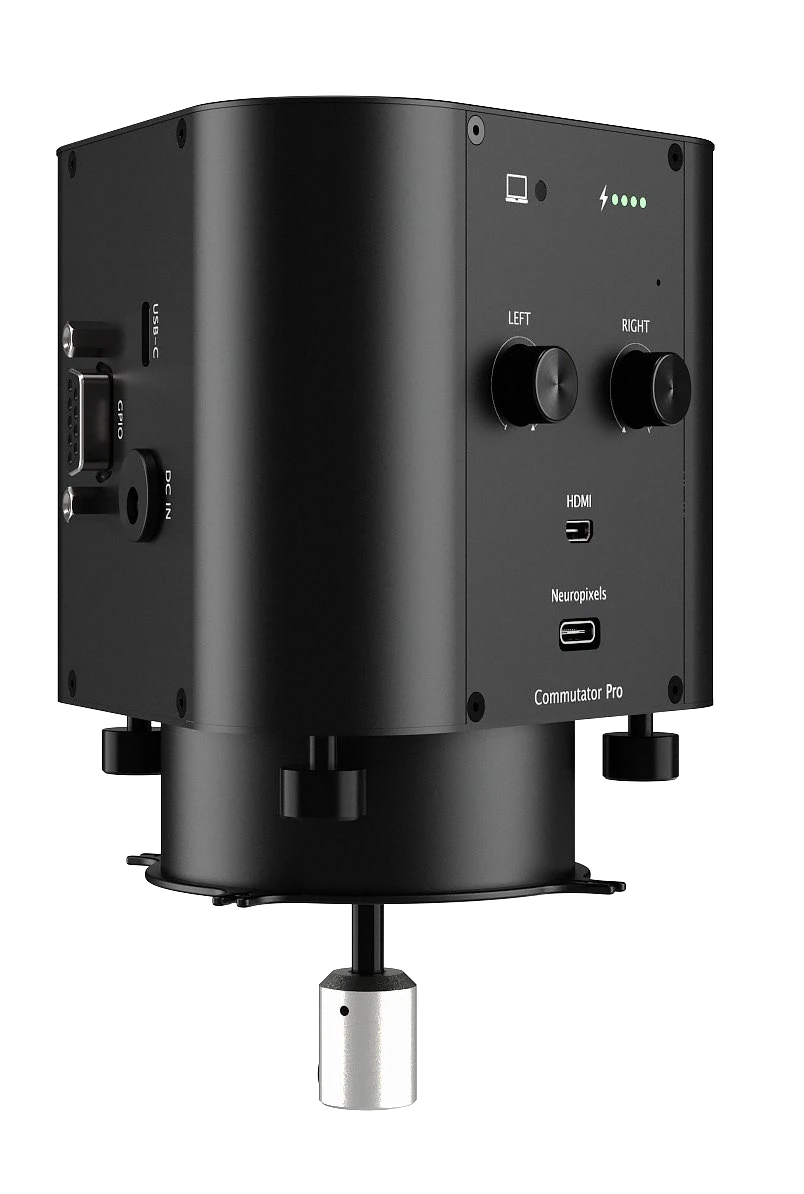
Commutator PRO — Neuropixels Commutator PRO, IMU sensor on the animal (I), 1 Neuropixels port, None, External power
Options
13 of 13Neuropixels Commutator PRO · IMU sensor on the animal (I) · 1 Neuropixels port · None · External power
Neuropixels Commutator PRO · IMU sensor on the animal (I) · 1 Neuropixels port · 5 mm fluidic / fiber passthrough (-PT) · External power
Neuropixels Commutator PRO · IMU sensor on the animal (I) · 2 Neuropixels ports · None · External power
Neuropixels Commutator PRO · IMU sensor on the animal (I) · 2 Neuropixels ports · 5 mm fluidic / fiber passthrough (-PT) · External power
Neuropixels Commutator PRO · IMU sensor on the animal (I) · 4 Neuropixels ports · None · External power
Neuropixels Commutator PRO · IMU sensor on the animal (I) · 4 Neuropixels ports · 5 mm fluidic / fiber passthrough (-PT) · External power
HDMI Commutator PRO · IMU sensor on the animal (I) · HDMI XR64/128-SR32 · None · External power
Dual Mode Commutator PRO · IMU sensor on the animal (I) · HDMI XR64/128-SR32 + 1 Neuropixels · None · External power
HDMI Commutator PRO · IMU sensor on the animal (I) · HDMI XR64/128-SR32 · 5 mm fluidic / fiber passthrough (-PT) · External power
HDMI Commutator PRO · IMU sensor on the animal (I) · HDMI XR64/128-SR32 · 5 mm fluidic / fiber passthrough (-PT) · Battery pack (-B)
Dual Mode Commutator PRO · IMU sensor on the animal (I) · HDMI XR32/64-SR16 + 1 Neuropixels · None · External power
Dual Mode Commutator PRO · IMU sensor on the animal (I) · HDMI XR32/64-SR16 + 2 Neuropixels · None · External power
HDMI Commutator PRO · Hall sensor on the rotor (M) · HDMI XR64/128-SR32 · None · External power
Loading the compatible products…
7 notes · Flexible Torque Sensing · Simultaneous Neuropixels + Passive Probe · Highly Customizable …
12 links · Product Brochure · Commutator PRO User Manual (Kontex) · Choosing a Commutator for Freely Moving Recording …